Skip to content
EduHubAdda

OSAPS BOU Edu BD Login Admit Card 2026 – Download BOU Admit Card
Kanjari BhattacharyyaAdmit Card

OSAPS BOU Login Admit Card 2026 – Download BOU Admit Card

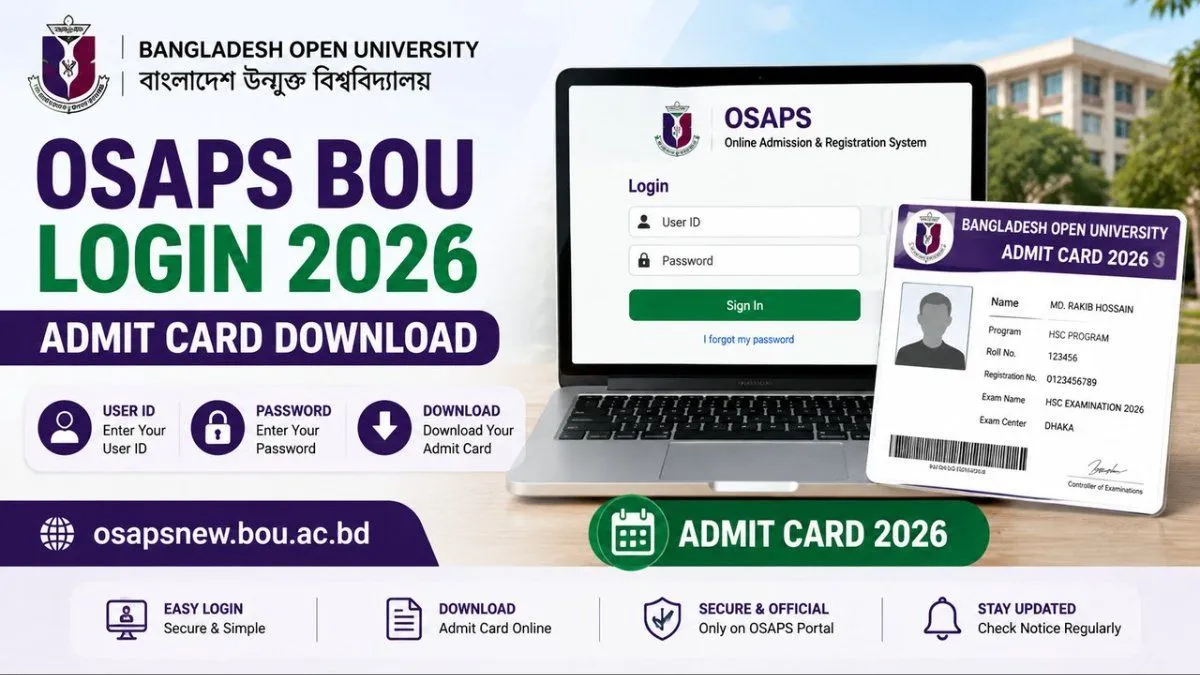
Access the OSAPS BOU login portal to download your 2026 admit card. Check the login process, User ID, password, exam date, centre and BOU admit card instructions.

The OSAPS BOU edu bd login admit card 2026 is available through the Bangladesh Open University (BOU) online system for eligible students and candidates whose examination or admission-test admit card has been issued. The OSAPS (Online Admission and Registration System) is used by BOU for online admission, registration and related student services.
For the BOU HSC Examination 2026, the university published an official notice on 10 July 2026 regarding the printing and use of candidates' photo-based admit cards.
Candidates should use the official OSAPS portal and their valid login credentials to access an available admit card.

OSAPS BOU Admit Card 2026 – Quick Overview

Particular
Details
University
Bangladesh Open University
Short Name
BOU
Online System
OSAPS
Full Form
Online Admission and Registration System
Year
2026
Admit Card
Examination/admission-test specific
Download Mode
Online
Login
User ID and Password
Official OSAPS Portal
osapsnew.bou.ac.bd
BOU Official Website
bou.ac.bd
HSC Admit Card Notice
10 July 2026
Exam Date
Programme-specific
Important: BOU issues separate admit-card notices for different programmes and examinations. Therefore, the exact download date and procedure can vary depending on whether you are an HSC student, admission-test candidate or enrolled in another BOU programme.


How to Download OSAPS BOU Admit Card 2026

If your admit card has been released, follow these steps:

Step 1: Visit the OSAPS Portal

Open the official BOU OSAPS login page.

Step 2: Enter Your User ID

Enter the User ID associated with your BOU application or student account.

Step 3: Enter Your Password

Enter your OSAPS password.

Step 4: Click Sign In

Submit your login information to access your OSAPS profile.

Step 5: Find the Admit Card Option

After logging in, check your profile or relevant examination section for the available Admit Card option.

Step 6: Download the Admit Card

Open the available admit card and download or print it.

Step 7: Check the Information

Before going to the examination, verify your:
Name
Photograph
Roll number
Registration/student information
Programme
Examination details
Examination centre
Date and time

Step 8: Print the Admit Card

Keep a clear printed copy of the admit card if the examination instructions require one.


BOU HSC Admit Card 2026

BOU has specifically published an official notice concerning the photo-based admit cards for candidates appearing in the HSC Examination 2026. The notice was published on 10 July 2026.
The university's examination notice listing also includes an HSC Examination Notice for 2026 dated 23 July 2026, along with a notice concerning the postponement of an HSC examination scheduled for 17 July 2026.
Therefore, HSC candidates should check the latest BOU examination notices for any changes to their examination schedule.


OSAPS BOU Login 2026

The OSAPS system is used for several BOU online processes, including admission and registration.
The official BOU website currently lists OSAPS (Online Admission & Registration) as one of its student services and provides OSAPS helpline numbers.
The current BOU website lists:
OSAPS Helpline: 01907451612
OSAPS Helpline: 01618977237
These details are also reflected in BOU programme documentation and the university's official website.


What If I Cannot Log In to OSAPS?

If you are unable to access your OSAPS account, check the following:

Check Your User ID

Make sure you are entering the correct User ID associated with your BOU application or student account.

Check Your Password

Enter your password carefully and make sure there are no unnecessary spaces.
The official OSAPS login page also provides an “I forgot my password” option. ([osapsnew.bou.ac.bd][3])

Check the Official Portal

Make sure you are using the official OSAPS website rather than an unofficial website.

Try Again Later

Temporary browser or server problems can sometimes prevent a successful login.

Contact OSAPS Support

If you still cannot access your account, contact BOU through its official OSAPS support channels.


BOU Admit Card 2026 – Who Can Download It?

The availability of an admit card depends on the particular BOU programme.
Candidates may need to download an admit card if they are:
Appearing in an HSC examination
Selected for an admission test
Appearing in a viva-voce
Taking another examination for which BOU issues an admit card
BOU's official notices demonstrate that admit-card procedures can be programme-specific. For example, an official 2026 programme notice instructed selected candidates for a viva examination to log in to osapsnew.bou.ac.bd using User ID and Password to download their admit card. ([osapsnew.bou.ac.bd][4])
Another official BOU programme notice provided a separate admit-card download period and similarly instructed candidates to log in using their User ID and Password. ([osapsnew.bou.ac.bd][5])
This means candidates should always check the notice associated with their particular programme.


BOU Admit Card Download Date 2026

There is no single admit-card download date for every BOU student.
The date depends on the examination or programme.
For example, BOU published the HSC 2026 photo-based admit-card notice on 10 July 2026. ([Bangladesh Open University][2])
Other BOU programmes have had different admit-card download windows. An official programme notice, for example, specified a particular February 2026 download period for candidates selected for a viva-voce examination. ([osapsnew.bou.ac.bd][5])
Therefore, don't rely on a generic date from a third-party website. Check the latest official notice for your programme.


What Information Is Included on the BOU Admit Card?

The exact information can vary by programme, but candidates should check their admit card for:
Candidate name
Photograph
Student ID or roll number
Registration information
Programme name
Examination name
Examination date
Examination time
Examination centre
Venue information
Candidate instructions
If any important information appears incorrect, contact BOU rather than manually changing the admit card.


What Should You Do After Downloading the BOU Admit Card?

Once you have downloaded your admit card:
  1. Open the document and check all information.
  1. Make sure your photograph is visible.
  1. Verify your examination details.
  1. Check the examination centre.
  1. Save a digital copy.
  1. Print the admit card if required.
  1. Keep your required identification documents ready.
  1. Check BOU notices for any schedule changes.
This is particularly important for the BOU HSC Examination 2026, because BOU has published notices concerning examination schedules and postponements.


BOU Exam Date 2026

The BOU examination schedule is programme-specific.
The official BOU examination notice board currently lists several 2026 updates, including:
HSC Examination Notice 2026
HSC examination postponement notice
Exam schedules for BA & BSS (Hons)
LLB (Hons) examination schedules
HSC admit-card notice
HSC attendance-sheet notice ([Bangladesh Open University][2])
Students should therefore check the examination notice for their specific programme instead of assuming that all BOU examinations follow the same schedule.


OSAPS BOU Admit Card 2026 – Important Tips

Before downloading or using your admit card:
Use the official OSAPS website.
Keep your User ID and Password safe.
Check the admit-card release notice for your programme.
Download the admit card as soon as it becomes available.
Check your photograph and personal information.
Verify the exam centre and date.
Keep a backup digital copy.
Print a copy if required.
Follow the instructions printed on the admit card.
Check the official BOU website for updated examination notices.


OSAPS BOU Login Admit Card 2026 – FAQs

How do I download my BOU admit card?

Visit the official OSAPS portal, log in using your User ID and Password, and check your profile for the available admit-card option.

What is the official OSAPS login website?

The official OSAPS login system is available at osapsnew.bou.ac.bd.

What login details are required?

Generally, candidates use their User ID and Password to access OSAPS services and available admit cards.

Is the BOU HSC Admit Card 2026 available?

BOU published an official notice on 10 July 2026 regarding the printing and use of photo-based admit cards for HSC Examination 2026 candidates.

What if I forgot my OSAPS password?

Visit the official OSAPS login page and use the “I forgot my password” option where available.

Is there one BOU admit card for all students?

No. Admit-card availability and download dates can differ according to the programme and examination.

Where can I check BOU examination updates?

Use the official BOU examination notice section for the latest examination schedules, postponements and admit-card notices.

How can I contact OSAPS?

BOU currently lists 01907451612 and 01618977237 as OSAPS helpline numbers.

Final Words

The OSAPS BOU edu bd login admit card 2026 search generally refers to candidates looking for the Bangladesh Open University's OSAPS login system and their available examination or admission-test admit card.
The correct process is simple: open the official OSAPS portal → log in with your User ID and Password → access the relevant examination/admit-card section → download and print the document.
Because BOU issues different notices for different programmes, candidates should always verify the admit-card release date, examination date and venue against the official notice for their particular programme. BOU's official 2026 examination notices include the HSC admit-card notice published on 10 July 2026 and subsequent examination updates.

Frequently asked questions

  • What If I Cannot Log In to OSAPS?

    If you are unable to access your OSAPS account, check the following:

  • BOU Admit Card 2026 – Who Can Download It?

    The availability of an admit card depends on the particular BOU programme. Candidates may need to download an admit card if they are: * Appearing in an HSC examination * Selected for an admission test * Appearing in a viva-voce * Taking another examination for which BOU issues an admit card BOU's official notices demonstrate that admit-card procedures can be programme-specific. For example, an official 2026 programme notice instructed selected candidates for a viva examination to log in to **osapsnew.bou.ac.bd using User ID and Password** to download their admit card. ([osapsnew.bou.ac.bd][4]) Another official BOU programme notice provided a separate admit-card download period and similarly instructed candidates to log in using their **User ID and Password**. ([osapsnew.bou.ac.bd][5]) This means candidates should always check the notice associated with their particular programme. ---

  • What Information Is Included on the BOU Admit Card?

    The exact information can vary by programme, but candidates should check their admit card for: * Candidate name * Photograph * Student ID or roll number * Registration information * Programme name * Examination name * Examination date * Examination time * Examination centre * Venue information * Candidate instructions If any important information appears incorrect, contact BOU rather than manually changing the admit card. ---

  • What Should You Do After Downloading the BOU Admit Card?

    Once you have downloaded your admit card: 1. Open the document and check all information. 2. Make sure your photograph is visible. 3. Verify your examination details. 4. Check the examination centre. 5. Save a digital copy. 6. Print the admit card if required. 7. Keep your required identification documents ready. 8. Check BOU notices for any schedule changes. This is particularly important for the **BOU HSC Examination 2026**, because BOU has published notices concerning examination schedules and postponements. ---

  • How do I download my BOU admit card?

    Visit the official OSAPS portal, log in using your **User ID and Password**, and check your profile for the available admit-card option.

  • What is the official OSAPS login website?

    The official OSAPS login system is available at **osapsnew.bou.ac.bd**.

  • What login details are required?

    Generally, candidates use their **User ID and Password** to access OSAPS services and available admit cards.

  • Is the BOU HSC Admit Card 2026 available?

    BOU published an official notice on **10 July 2026** regarding the printing and use of photo-based admit cards for HSC Examination 2026 candidates.

  • What if I forgot my OSAPS password?

    Visit the official OSAPS login page and use the **“I forgot my password”** option where available.

  • Is there one BOU admit card for all students?

    No. Admit-card availability and download dates can differ according to the programme and examination.

  • Where can I check BOU examination updates?

    Use the official BOU examination notice section for the latest examination schedules, postponements and admit-card notices.

  • How can I contact OSAPS?

    BOU currently lists **01907451612** and **01618977237** as OSAPS helpline numbers.

Comments

The thread is quiet
If something in the piece stuck with you, leave the first note below.

Join the conversation

A short response is enough. We’ll review it before it appears on the site.

Kept for moderation. Email stays private.